
Your Google Profile Has a Booking Button. Do You Know Where It Sends People?

A new client’s first contact with your barbershop is often on Google. They search “barber near me”, tap your name on the map, glance at the photos and reviews, and look for a way to book. Whatever happens next is decided by a setting most owners last looked at years ago, if at all.
The booking link on your Google Business Profile isn’t a small piece of admin. It decides whose booking page a new client meets first, whose terms apply to that booking and which system the client’s details are recorded in. Owners who check it now and then control their own front door. Owners who don’t may find someone else has been answering it for them.
What Google actually shows
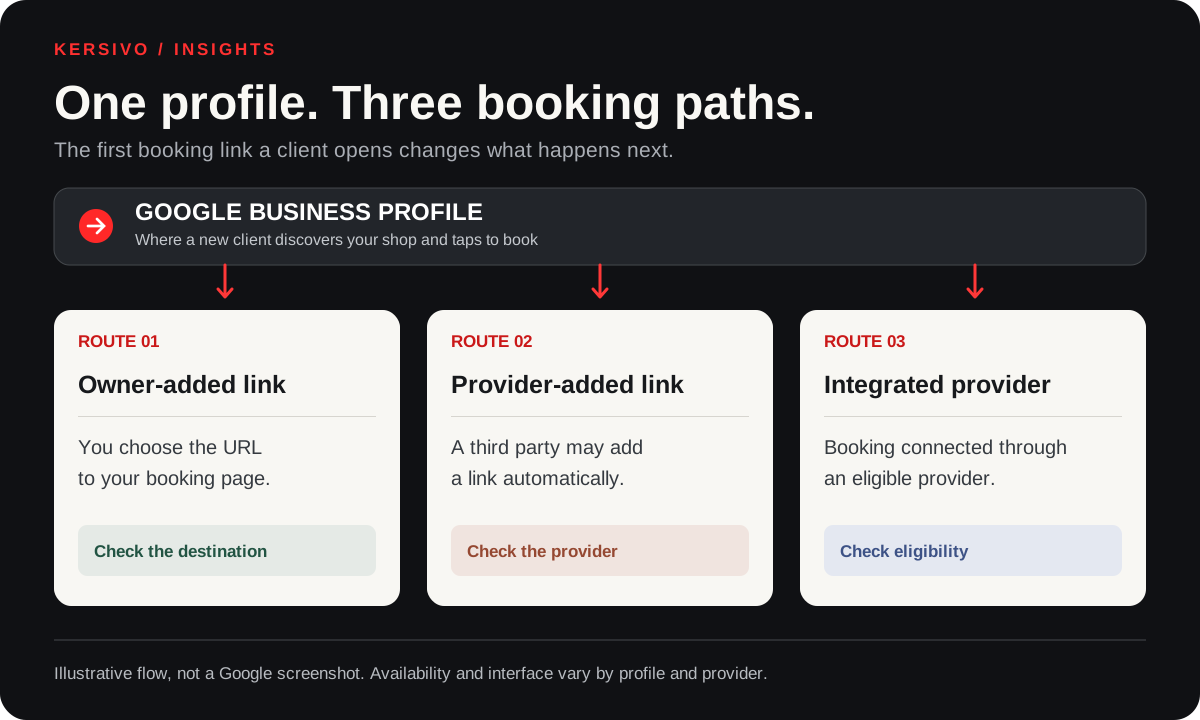
Google’s own help pages describe two kinds of booking link, and the difference matters.
The first is a link you add yourself. In your Business Profile you choose Booking, then “Add link”, paste the address of your booking page and save. Google allows up to ten links per category, so a profile can carry several booking links at once. If there’s more than one, you can mark one as “Business preferred”, which puts it at the top.
The second kind arrives without you doing anything. Google works with selected third-party providers, and links to their services “can automatically appear” on Business Profiles in Search and Maps. These are supplied and updated by the providers or by Google’s automated data, not by you.
There’s also a third possibility, sometimes shown as a booking option built into Google itself. Google calls this Reserve with Google, and says it is “only available in certain countries/regions for businesses that work with a supported scheduling provider”. The UK and barbershops are both on Google’s current supported lists, but your profile only gets it if your booking system is one of the providers that connects to it. A link you add yourself is just a link; whether Google also shows its own booking option depends on that eligibility and that provider, not on anything you paste in.
Put those together and the risk is clear. Your profile can show a booking link to a provider you don’t use, or no longer use, next to the one you do. A client in a hurry taps the first option they see. If that option is a marketplace listing for your shop, the booking happens on the marketplace’s terms. If the listing is out of date, the client may not be able to book at all.
Why it’s worth ten minutes
The cost of the wrong link depends on what sits behind it, so it’s worth thinking through rather than assuming.
If the link goes to a marketplace you deliberately use, that may be fine. Marketplaces can bring clients who would never have found you, and some charge for that. Check what your own agreement says about bookings that start on Google.
If the link goes to a marketplace you’ve left, or one that lists your shop without your involvement, the cost is harder to see. A client who can’t book may simply try the next shop on the map.
Here’s a hypothetical to show the scale, not a figure about any real provider. Suppose four new clients a week reach you through a link where a provider charges a 15% fee on a £25 first visit. That’s £3.75 a booking, £15 a week, and £720 over a 48-week year. Change the numbers to match your own agreement; the point is that a setting nobody looks at can carry a real price.
There’s a less obvious cost too. A client who books through the system you run your diary from will usually appear in that system’s client records straight away, with their contact details, visit history and the reminders you set up. A client who books through someone else’s platform may reach your records only partly, or only after you copy them across, and what you can see or export depends on that platform’s terms.
That’s a question of access, not of who “owns” the client. Under UK data protection law, the business that decides why and how client details are used is the controller, and a booking platform that only handles the details on your instructions is a processor. Some marketplaces also use the details for their own purposes, which can make them a controller too. Which applies is set by the platform’s terms and how it actually operates, so read its terms and data processing agreement rather than assuming.
The strongest case for leaving it alone
There is a fair argument for not touching it. Google’s integrated booking providers can offer things a plain link can’t. Google says booking through an integrated provider gives clients services that “work well” with their Google accounts, including reminders and easy use of Google Calendar. Google’s performance report also includes a Bookings figure, the number of bookings people completed, but only where “your bookings must be managed through a booking provider”.
That is a real trade-off. With your own link you control where clients go but don’t get Google’s Bookings count. With an integrated provider you get the statistics and the convenience, but on the provider’s terms. Google’s help page also warns that “your provider might charge you” when people book through Google.
Neither choice is wrong. The mistake is not choosing, and letting whatever happens to be there decide for you.
How it differs by shop
For an owner-operator, the profile is often the shop’s main window online, and the decision is simple: send clients to the system you actually use to run your diary.
For a shop with an employed team, the same applies, but it’s worth checking that the booking page the link opens shows the whole team and the right services, not one barber’s old page.
For shops with self-employed chair renters, it’s more complicated. The Google profile usually belongs to the shop, but renters may take their own bookings through their own systems. A single “Business preferred” link can only send clients one way. Agree with your renters which link sits at the top, or whether the shop page should point clients to each barber’s own booking page. That’s a commercial conversation, and it’s better had before a renter discovers their clients have been sent elsewhere. One narrow technical point: Google’s platform policies for its Appointments Redirect integration, the rules that booking providers follow when they connect merchants to Google’s booking features, say a merchant’s address must be the place where it conducts the service and “holds ownership of (no booth renters)”. That rule applies to listings supplied through that integration. It doesn’t stop a self-employed barber having a Google Business Profile, adding their own booking link, or taking bookings in other ways, so check with your booking provider how it handles renters at your address.
Checking your own profile
Start by looking at your profile the way a client does. Search for your shop on Google and on Google Maps, on a phone, while signed out of your business account. Note every booking option shown and where each one goes. Then book a test appointment, or at least go as far as the payment step, through each one.
Next, open your Business Profile and go to Booking. Remove links you no longer want, add your own if it’s missing, and set your preferred link. If a third-party provider’s link appears and you don’t want it, Google’s help page says you can select “Remove provider”, and providers must act on a removal request within five days. If a provider doesn’t, Google directs owners to report it.
Then decide how you’ll know whether the link works, because there are three different measures and they don’t answer the same question:
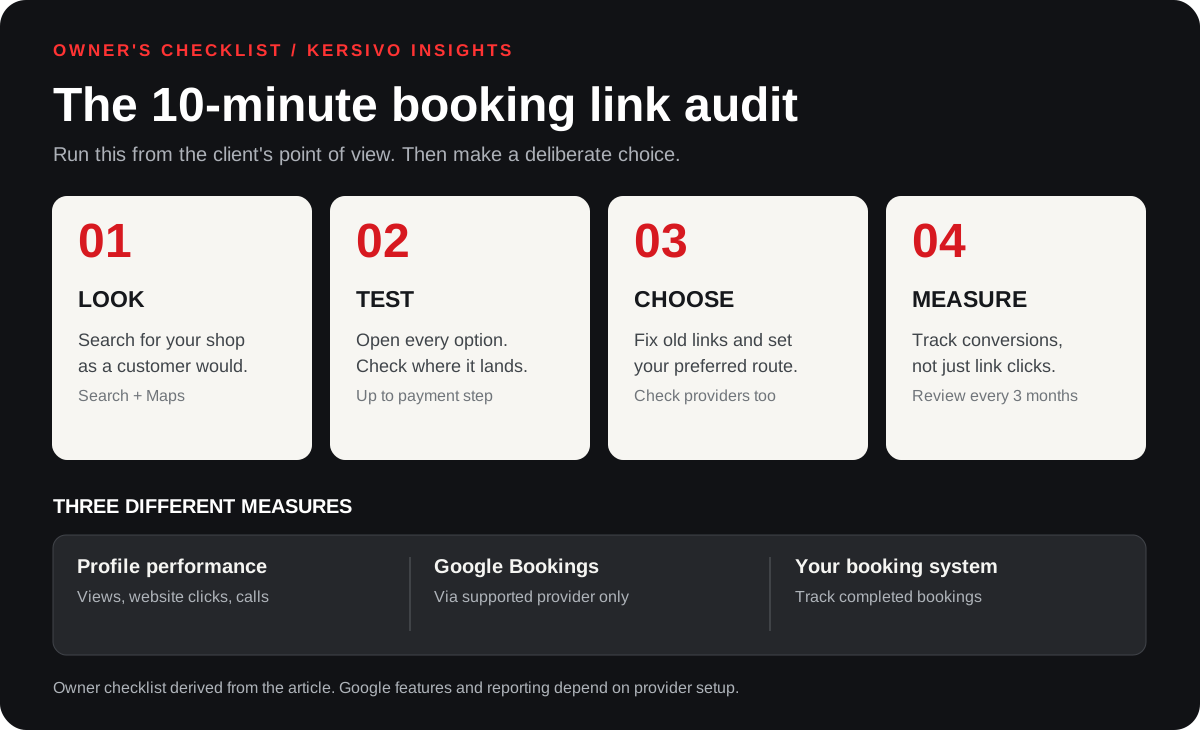
- Google’s Bookings count appears only for bookings made through an integrated booking provider.
- Google’s profile performance report shows interactions with the profile itself, such as views, calls, direction requests and website clicks. It tells you people tapped through, not that they booked.
- Your own tracking can close the gap. If you add a tracking tag (a UTM code) to the booking link and your booking page runs an analytics tool such as Google Analytics, you can see visits and, if it’s set up, completed bookings that came from the profile.
If none of that is available, your own booking system may still show where bookings came from. Failing that, asking new clients how they found you, and noting it, is better than guessing.
Finally, put a reminder in the diary to check it again. Links added by providers can reappear, staff change and booking pages move. A check every few months takes a few minutes.
Where KERSIVO fits
If you use KERSIVO, its Starter plan includes guided setup for adding your KERSIVO booking link to your Google Business Profile. Whatever system you use, the checks above are the same: the link should go to the booking page you actually run your diary from.
The decision
Your Google profile may be the first place a new client tries to book, so treat the link on it as a business decision, not a setting. Decide which system you want new clients to meet, make that the preferred link, remove anything that sends them elsewhere without your agreement, and find your own way to measure what comes through. Then check it again in three months, because if you don’t, someone else may change it for you.
References (checked 16 October 2026; items 4–7 added and 1–2 rechecked in v2)
- Google Business Profile Help, “Manage your local business links” — https://support.google.com/business/answer/6218037?hl=en-GB
- Google Business Profile Help, “Set up bookings through a provider” — https://support.google.com/business/answer/7475773?hl=en-GB
- KERSIVO Starter page (last updated 6 October 2026) — https://kersivo.co.uk/starter
- Google Business Profile Help, “Understand your Business Profile performance and insights” — https://support.google.com/business/answer/9918094?hl=en-GB
- Reserve with Google Help, “Get started with Reserve with Google” — https://support.google.com/reserve/answer/9172607?hl=en
- Google Actions Center, Appointments Redirect platform policies (merchant eligibility; supported merchant types and countries) — https://developers.google.com/actions-center/verticals/appointments/redirect/policies/platform-policies
- ICO, “Controllers and processors” — https://ico.org.uk/for-organisations/uk-gdpr-guidance-and-resources/controllers-and-processors/controllers-and-processors/